

Employment FAQs
Explore the areas below:
Personal Updates:
- Q. How can I complete an Employment verification?
- A. Employment Verification is completed by the Payroll department; additional information
can be found on the Payroll Department website.
- A. Employment Verification is completed by the Payroll department; additional information
can be found on the Payroll Department website.
- Q. How do I complete Notary Services?
- A. If you need a document notarized, reach out to the HR Assistant. Information can
be found on the Human Resources Contact Us website to schedule an appointment.
- A. If you need a document notarized, reach out to the HR Assistant. Information can
be found on the Human Resources Contact Us website to schedule an appointment.
- Q. How do I update my personal information?
- A. Go to University portal, click on Employee dashboard, and then click “My Profile” use the pencil icons on the profile page to update your personal information.
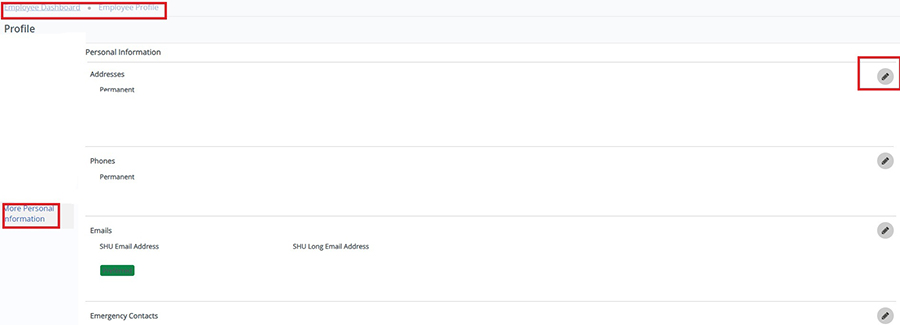
- A. Go to University portal, click on Employee dashboard, and then click “My Profile” use the pencil icons on the profile page to update your personal information.
- Q. How do I change/update my Legal name?
- A. To change your name, complete the personal data form on the Employee Forms website, and bring your Social Security card with the new name, then schedule an appointment with the HR Assistant, you can find contact information on the Human Resources Contact Us website.
Employee Relations / Worker Compensation:
- Q. How do I apply for reasonable accommodation?
- A. You can find the Policy and related forms on the Policy on Reasonable Accommodations for Employees with Disabilites website. If you have questions regarding accommodations, reach out to the Associate
Vice President, Chief Human Resources Officer. Information can be found Human Resources
Contact Us website.
- Q. Whom do I contact after a workplace injury?
- A. You can reach out to the HR Coordinator or the Senior Manager, Employee and Labor Relations. Information can be found on the Human Resources Contact Us website.
Separations:
- Q. When can I expect my vacation payout?
- A. When employees separate, departments complete a separation ePAF to inform HR of the
last day. Based on timing of the ePAF, HR processes payout of unused vacation in the
next pay cycle.
- A. When employees separate, departments complete a separation ePAF to inform HR of the
last day. Based on timing of the ePAF, HR processes payout of unused vacation in the
next pay cycle.
- Q. What happens if I am enrolled in Tuition Remission and I no longer work for the university?
- A. When an employee separates from the University for any reason other than because of total disability, retirement or death, the tuition remission benefit terminates immediately for the employee and his/her spouse and dependents. Tuition must be paid to the University in accordance with guidelines established by Enrollment Management if the former employee, or his/her spouse or dependent, wishes to continue attending classes. This is prorated with leaving mid semester; additional information can be found on the Policy on Tuition Remission Benefit website.
Managers:
Hiring:
- Q. How can I access PageUp?
- A. Go to your Employee section in the University Portal, in the Human Resources box
select the “Page Up-Applicant Tracking System” link.
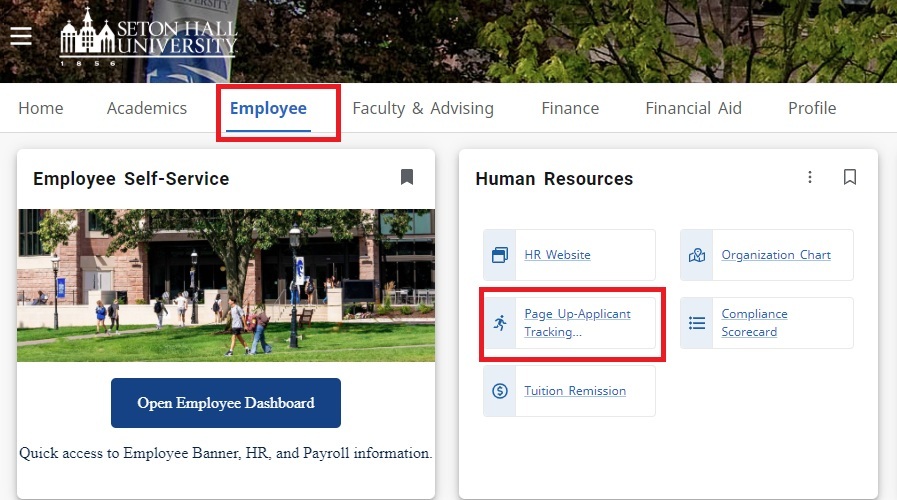
- A. Go to your Employee section in the University Portal, in the Human Resources box
select the “Page Up-Applicant Tracking System” link.
- Q. How do I post a job?
- A. Click on the PageUp - How to Post Position guide in the resources section on the Hiring Resources page. To find additional information on the Recruitment and Employment process, please
visit our Recruitment website.
- A. Click on the PageUp - How to Post Position guide in the resources section on the Hiring Resources page. To find additional information on the Recruitment and Employment process, please
visit our Recruitment website.
- Q. How do I access applications?
- A. Click on the link to our How to View Applicants guide for resources.
- A. Click on the link to our How to View Applicants guide for resources.
- Q. How do I Submit a Hiring Proposal?
- A. Click on the link to our How to Submit a Hiring Proposal guide for resource.
- A. Click on the link to our How to Submit a Hiring Proposal guide for resource.
- Q. How can I request a temp?
- A. Go to the Employment of Temporary Workers website to submit a Request for Temporary Staffing.
- A. Go to the Employment of Temporary Workers website to submit a Request for Temporary Staffing.
- Q. How can I provide my temp with login access and a laptop?
- A. Reach out to Service Desk IT at the information below for direction/assistance:
- (973) 275-2222
- [email protected]
- https://servicedesk.shu.edu/
- A. Reach out to Service Desk IT at the information below for direction/assistance:
- Q. How often do I have to take Search Committee training?
- A. Search committee training needs to completed on an annual basis.
Training
- Q. How often do I have to take Search Committee training?
- A. Search committee training needs to completed on an annual basis.
- Q. How can I access various training courses on Campus?
- A. You can access various trainings through the TLTC. Click on this link to register/see availability TLTC.
- A. For Soft skills Trainings reach out to the Manager, Training and Organizational Development. Information can be found on the Human Resources Contact Us website.
- Q. How do I know if I have completed the mandatory University trainings?
- A. Employees can look at their "Compliance Scorecard" to check the status in the University portal: click the "Employee" tab under the Human Resources section, select "Compliance Scorecard".
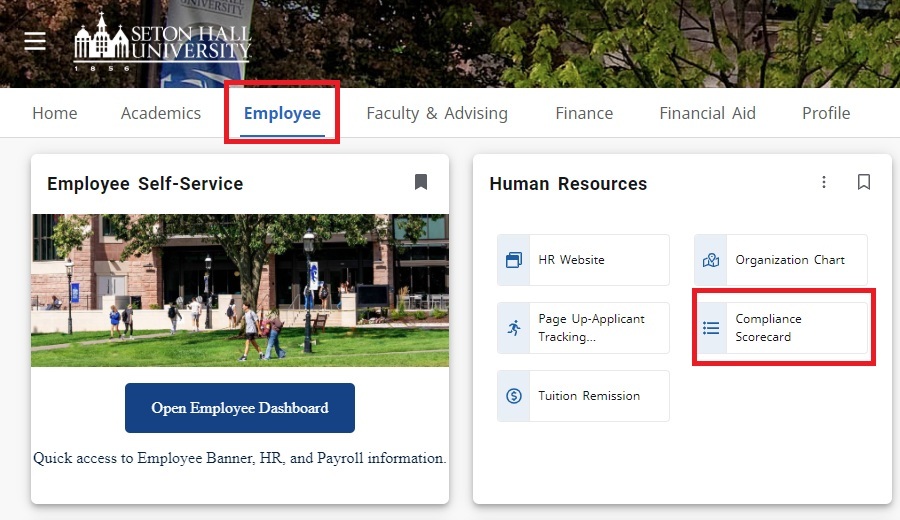
- A. Employees can look at their "Compliance Scorecard" to check the status in the University portal: click the "Employee" tab under the Human Resources section, select "Compliance Scorecard".
Tuition Remission:
- Q. How do I begin the process for Tuition Remission for myself?
- A. You must first begin by registering for the class/classes. Once this is complete, go to the Tuition Benefits page and select the Tuition Remission Application. For the application instructions reach out to the HR Manager, Training, and Organizational Development if you have additional questions.
- *** You will need to complete a Job-related Graduate Application Form found on the Tuition Benefits page if applicable.
- Please note that you will need to apply every semester for tuition remission and submit
a job-related form.
- Q. When am I eligible for tuition remission?
- Tuition Remission Eligibility - All regular full-time and part-time employees, including members of the faculty,
Priests, Religious Brothers and Sisters, administrators, and staff are eligible for
the Tution Remission benefit.
Recepient Category Eligibility Period Full-Time Employees 3 months of continuous employment* Part-Time Employees 500 hours of continuous employment* Spouses and Dependent Children 6 months of continuous full-time employment or 1,000 hours of continuous part-time employment* *Semester or session following eligibility period
- Tuition Remission Eligibility - All regular full-time and part-time employees, including members of the faculty,
Priests, Religious Brothers and Sisters, administrators, and staff are eligible for
the Tution Remission benefit.
- Q. What does Tuition remission cover?
- A. Please see the Policy on Tuition Remission Benefits.
Tuition Exchange
- Q. How do I know if I am eligible for the tuition exchange scholarship?
- A. Dependent children of regular, full-time, active employees are eligible to apply for tuition exchange scholarships in accordance with deadlines set by the University each year for acceptance of tuition exchange scholarship applications, following the employee’s completion of six (6) months of continuous service. Contact the Manager of Training and Organizational Development / Tuition Exchange Liaison Officer (TELO). Additional information can be found on the Tuition Exchange Scholarship Program website.
- Q. What do I need to provide for my dependent child to participate in Tuition Exchange?
- A. Submit the application for Tuition Exchange Scholarship program after eligibility
approval and you will need to complete dependent verification process:
- i. A birth certificate and your most recent tax returns showing household dependency & HR affidavit
- ii. You will also need to submit their FAFSA every year
- A. Submit the application for Tuition Exchange Scholarship program after eligibility
approval and you will need to complete dependent verification process:
- Q. Are there any fees associated with Tuition exchange?
- A. Yes, there is a $50 application fee and a $50 participating fee.
- ** For additional questions about Tuition exchange review the Tuition Exchange Scholarship Program for more information.
- A. Yes, there is a $50 application fee and a $50 participating fee.