

What’s New in Microsoft 365 – November 2026
Wednesday, November 18, 2026
Microsoft 365 continues to introduce new features and updates to existing applications, along with changes to some familiar tools. Explore the latest updates to learn how they may affect your experience with Microsoft 365 and what to expect in the coming months.
Microsoft Teams: Expanded Breakout Room Capacity
Microsoft Teams now supports breakout rooms in meetings with up to 1,000 participants, an increase from the previous limit of 300. Meeting organizers can create up to 100 breakout rooms, making it easier to divide large classes, workshops and University events into smaller discussion groups. The expanded capacity is available automatically, with no changes to how breakout rooms are created or managed.
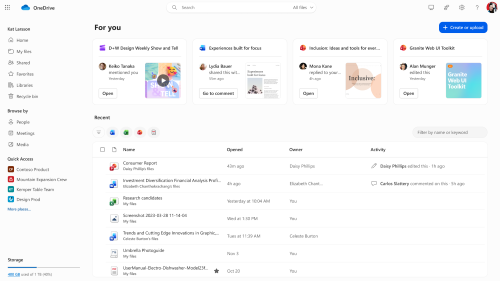
Microsoft OneDrive: Updated Create and Upload Button
Microsoft OneDrive is changing the location of the Create or upload button in its web interface. The button will move from the left navigation menu to the right side of the page, making its placement more consistent with SharePoint. Users will still have the same options for creating files and folders or uploading documents, but the button will no longer appear in the Libraries, Recycle Bin, Meetings or Media sections.
Microsoft Teams: Slide Translation in PowerPoint Live Ending November 30
Microsoft is retiring the Translate slides feature in PowerPoint Live on November 30. Meeting attendees will no longer be able to translate presentation slides into their preferred language while viewing them in Teams. Slides will appear in their original language, so presenters working with multilingual audiences should consider providing translated versions in advance. Other PowerPoint Live features will remain available.
Coming Soon to Microsoft 365
Microsoft Teams: AI-Powered Phishing Detection
Beginning in December, Microsoft Teams will introduce AI-powered phishing detection to help identify suspicious messages and potential scams. The feature examines the context of conversations to detect warning signs that may not involve suspicious links or attachments. It will initially focus on higher-risk interactions, such as conversations with external contacts for the first time. Microsoft states that message content will not be stored or used to train AI models.
Microsoft Teams: Updated iPhone and iPad Requirements
Beginning in December, new versions of Microsoft Teams will require iOS 18 or later on iPhones and iPadOS 18 or later on iPads. Users running iOS 17 or iPadOS 17 will no longer receive new Teams updates, although their existing app installations will continue to work without official support. To continue receiving the latest features and security updates, users should update their device's operating system and install the latest version of Teams from the Apple App Store.
Microsoft Teams: Changes to Voicemail Email Notifications
Beginning in March 2027, Microsoft Teams will change how voicemail notifications appear in email. Instead of displaying the caller's name or phone number in the sender field, notifications will identify Microsoft Teams as the sender, with caller information appearing in the subject line and message body. This update is designed to improve email security and reduce the risk of impersonation. Users will continue to receive voicemail notifications and caller information within Teams will remain unchanged.
Categories: Science and Technology