
What’s New in Microsoft 365 – September 2026
Wednesday, September 16, 2026
Microsoft 365 continues to evolve, with several applications and features scheduled for retirement or significant changes in the coming weeks and months. Students, faculty and staff should review the changes below, as some require action before the retirement dates.
Microsoft Teams: New Web Address Coming in September
Teams web users will be redirected from teams.microsoft.com to teams.cloud.microsoft by the end of September. The change only affects the web address and will not change Teams features or functionality.
Existing Teams links and bookmarks will continue to work and redirect automatically. Users may notice the new .microsoft address when accessing Teams through a web browser. No action is required.
Microsoft Teams: Google Calendar Sync Ends October 1
Microsoft is retiring the ability to synchronize Google Workspace calendars with Microsoft Teams, with action required by October 1, 2026. Seton Hall users who have a Google calendar configured to sync with Teams will no longer see events from that calendar appear or update in Teams.
Users who also use Google Calendar to schedule Teams meetings can continue doing so with the Microsoft Teams Meeting add-on for Google Workspace. The add-on allows a Teams meeting to be created from Google Calendar, but it does not synchronize Google and Microsoft calendars.
Microsoft Publisher: Support Ends October 1
Microsoft Publisher will be retired from Microsoft 365 on October 1, 2026. After that date, users will no longer be able to use Publisher to open or edit Publisher (.pub) files.
Users with Publisher files they may need in the future should convert them before October 1. Files that only need to be viewed, shared or printed can be saved as PDFs, while content that requires continued editing should be moved to Microsoft Word or PowerPoint. Microsoft also offers templates through Microsoft Create for many common Publisher projects.
Microsoft Word: Similarity Checker Retiring October 3
Microsoft is retiring Similarity Checker in Word on October 3, 2026. After that date, users will no longer be able to use the feature to identify passages in a document that are similar to content found online.
Other Microsoft Editor features will remain available, including spelling, grammar, clarity and style suggestions. Users who rely on Similarity Checker to review documents for originality should plan to use an alternative solution.
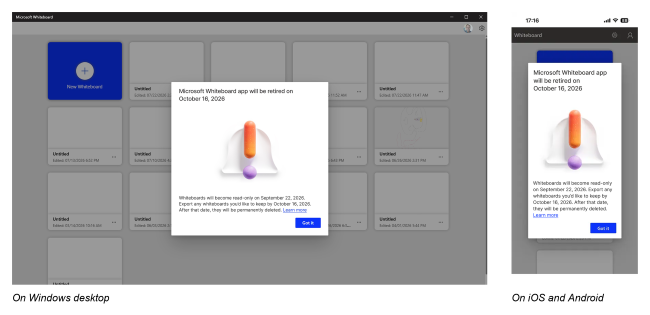
Microsoft Whiteboard: Standalone Apps Retiring October 16
Beginning October 16, 2026, Microsoft will retire the standalone Whiteboard apps for Windows, iOS and Android. After that date, users will no longer be able to access their Whiteboards through the installed apps.
Whiteboard will remain available through Microsoft Teams and supported web experiences. Users who currently use a standalone app should transition to one of these options before October 16 to continue accessing their content.
Microsoft 365 Copilot: Learning Coach Retiring in October
Microsoft is retiring the Learning Coach agent in Microsoft 365 Copilot in early October. After the retirement, users will no longer have access to its personalized learning recommendations and skill development guidance.
Users who currently use Learning Coach should save any important information from existing conversations before the agent becomes unavailable. Microsoft recommends transitioning to Learning Agent, which provides personalized recommendations and helps users find relevant learning content.
Microsoft SharePoint: Classic Publishing Sites and Pages Being Retired (March 2027)
Microsoft is beginning the retirement of classic publishing features in SharePoint Online. Starting in March 2027, users will no longer be able to create new classic publishing sites or activate publishing features on existing sites. Current classic pages will remain available for viewing and editing.
Beginning in October 2028, user-created classic pages, including wiki, web part and publishing pages, will become read-only. Microsoft recommends identifying active classic content and transitioning it to modern SharePoint experiences before these changes take effect.
Additional Resources:
Categories: Science and Technology