

What’s New in Microsoft 365 – July 2026
Thursday, July 23, 2026
Microsoft SharePoint: Create Reusable AI Skills
AI in SharePoint now allows users with edit permissions to create reusable AI skills using natural language. These skills can automate common tasks, such as reviewing documents or organizing content, helping streamline repetitive work and deliver more consistent results.
Microsoft Outlook: Send Availability Retired on Mobile
The Send Availability feature has been removed from Outlook for iOS and Android. When composing an email on a mobile device, you will no longer see the option to share your availability directly from your calendar. You can still check your Outlook calendar and include your available dates and times manually when responding to meeting requests or scheduling emails.
Microsoft Teams: Planner Now Available in Shared and Private Channels
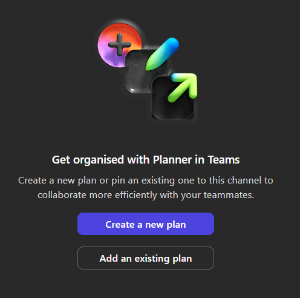
Microsoft Planner is now available as a tab in Microsoft Teams Shared and Private channels. You can create a new plan or add an existing one directly within a channel, making it easier to organize tasks and track work where your team is already collaborating.
Coming Soon to M365
Microsoft Teams: Private Chat for Meeting Organizers and Presenters (August)
Microsoft Teams will introduce a private chat for organizers, co-organizers and presenters in meetings, webinars and town halls. This separate chat allows event organizers to communicate privately before, during and after an event without attendees seeing the conversation.
Microsoft Forms: New Email Address for Automated Messages (August)
Automated emails generated by Microsoft Forms, such as response receipts and form submission notifications, will be sent from a new email address. Instead of [email protected], these messages will come from [email protected]. If you use Outlook rules or filters based on the previous sender address, update them to ensure you continue receiving these notifications.
Microsoft Outlook: Meeting Insights Is Retiring (September)
Microsoft will retire the Meeting Insights feature in Outlook. Meeting Insights currently displays related emails and files within meeting details to help users prepare for upcoming meetings.
Users with a Microsoft 365 Copilot license will instead see the Prepare for this meeting experience, which summarizes relevant meeting context, tasks and documents they have permission to access. Users without a Copilot license will no longer see Meeting Insights in meeting details.
Microsoft Teams: Connect Meetings to Existing Planner Plans (September)
Microsoft Teams meetings will be able to connect to an existing Microsoft Planner plan. Instead of creating a new plan for each meeting, you can add meeting tasks to an existing plan, making it easier to keep related tasks organized in one place.
If you do not select an existing Planner plan, Teams will continue to create a new plan for meeting tasks as it does today.
Microsoft Planner: More Flexible Task Dates (October)
Microsoft Planner is rolling out a more flexible way to manage task dates. As the update becomes available, changing a task's start date will no longer automatically adjust its due date, and changing the due date will no longer update the start date. This gives you more control over task timelines.
If you use both start and due dates to organize your work, review them carefully to ensure they reflect your intended schedule, as Planner will no longer update them automatically.
Categories: Science and Technology