

What’s New in Microsoft 365 - January 2026
Wednesday, January 21, 2026
Microsoft 365 will continue to receive updates throughout 2026, bringing improvements to collaboration, productivity and usability across its tools. Below are the first updates rolling out early in the year, with additional changes expected in the months ahead.
Outlook for Windows: Automatic Switch to the New Outlook
This month, users will be automatically switched from classic Outlook to the new Outlook for Windows. This change is intended to introduce users to a more modern Outlook experience, with updated design, improved performance and new features such as message pinning, snoozing and enhanced customization. Users will receive advance notice within Outlook before the change takes place and can choose to switch back to classic Outlook at any time.
Microsoft Teams: Browser selection for links in Teams Mobile
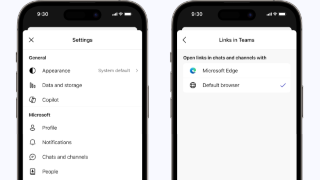
Beginning February, Microsoft Teams on mobile devices will let you choose how links open when tapped in chats or channels. You can open links in your device’s default web browser, such as Safari or Chrome, or within the Teams in-app browser.
This update gives you more flexibility when viewing shared content on your phone or tablet, especially if you prefer using saved passwords, bookmarks or accessibility features already set up in your browser. No action is required and you can change this preference at any time in the Teams mobile app settings.
Microsoft Teams: Expanded Private Channels Limits and Meetings
Microsoft Teams will introduce expanded capabilities for private channels. The limit on private channels per team will increase from 30 to 1,000 total channels and private channel membership will expand from 250 to 5,000 members. Meetings can also be scheduled directly within private channels.
These changes make private channels more flexible for collaboration, especially for large projects, departments or cross-functional groups that need focused conversations and meetings within a team.
Microsoft Planner: New Features and Retirement of Several Planner Capabilities
Microsoft Planner will begin rolling out a major update in early 2026, introducing new features while retiring several existing capabilities. New enhancements include task chat for basic plans, custom templates for reusable plan layouts and expanded availability for its users.
As part of this update, several Planner features will be retired. The existing task comments experience will be replaced with task chat, the whiteboard tab for premium plans will be removed and integrations with Viva Goals, iCalendar feeds and Loop components will no longer be supported. During the rollout, some functionality, such as converting a basic plan to a premium plan, will be temporarily unavailable.
Microsoft Teams: Custom Templates for Immersive Events
Beginning in mid-February, Microsoft Teams will allow users to create, save and reuse custom templates for immersive events directly within the Teams Meet app. Immersive events take place in 3D virtual spaces where participants join as avatars and interact in a shared environment, offering a more engaging alternative to traditional meetings.
Event organizers can design immersive environments once, save them as templates and
share them with collaborators for future use. No action is required and this feature
will be available by default for Teams desktop and web users who create or manage
immersive events. 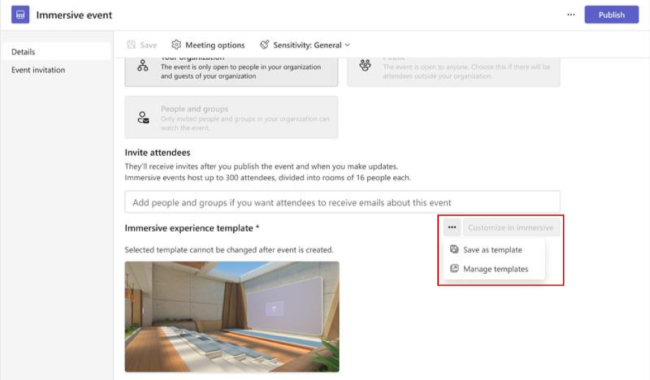
Microsoft Lens: App Retirement and Transition to OneDrive
The Microsoft Lens mobile app for iOS and Android will be retired in early 2026. The app will be removed from app stores on February 9 and scanning will stop on March 9. Users who already have the app installed can continue to view existing scans after that date, but creating new scans will no longer be supported.
Users who rely on Microsoft Lens for scanning documents should begin using the scan feature in the OneDrive mobile app, which provides similar functionality for capturing and saving documents, receipts and whiteboards. No action is required unless you currently use Microsoft Lens for scanning.
Outlook on the Web: New People Hub Experience
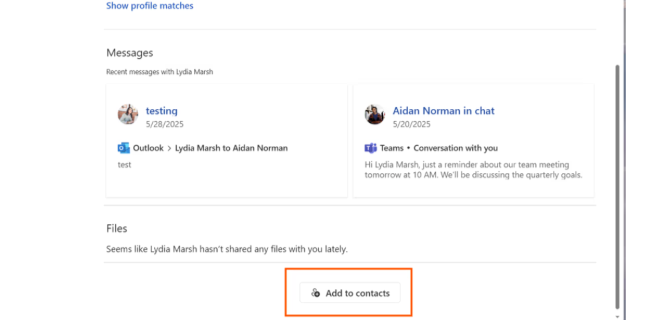
Outlook on the Web will introduce a new and improved People Hub with a refreshed, multi-column layout and faster, more reliable contact search. The updated experience provides a unified view of each person, automatically links duplicate contacts and enhances contact details using organizational profile information when available.
This new People Hub will replace the existing Contacts experience and will be enabled automatically for all Outlook on the web users. The update is designed to make finding, managing and viewing contacts easier and more consistent.
Microsoft Planner: Feature Updates and Retirements
Beginning in early 2026, Microsoft Planner will receive a major update that introduces new planning and collaboration features while retiring several existing ones. These changes affect Planner in Teams and on the web and are part of a broader effort to modernize the Planner experience.
The following Planner features will be retired, along with recommended alternatives:
-
Task comments will be replaced by a new task chat experience that supports richer conversations and @mentions directly on tasks
-
Whiteboard tab in premium plans will be removed; existing whiteboards will remain available in the Microsoft Whiteboard app
-
Planner integration with Viva Goals will end as Viva Goals is retired
-
iCalendar task feeds will no longer be available; tasks will continue to be accessible directly in Planner and Teams
-
Planner components in Loop pages will be retired; users should use Task List components in Loop instead
No action is required, but users who rely on these features may want to explore alternative options within Planner, Teams or Loop as the updates take effect.
Categories: Science and Technology